

Tasks, habits, notes and calendar. One planner for iPhone and iPad.
Your day on one thread.
Events, tasks and habits in time order, and notes that link to all of it. Plan your day, keep your notes, and see how everything connects.
Coming soon to the App Store
- Free for 7 days
- No account
- iOS 17 or later
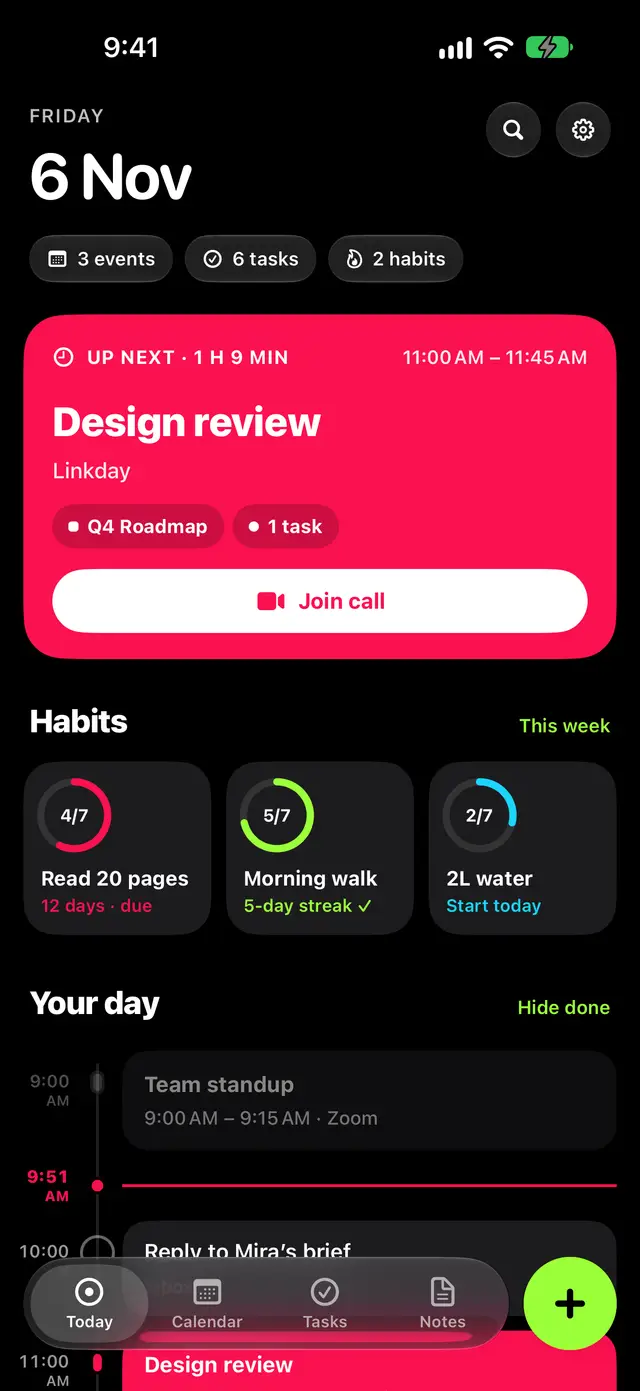
Linkday puts your events, tasks, habits and notes on one thread, and links them together.
Works with your calendars and Apple Reminders · Syncs through your own iCloud
One app. Everything connected.
Your calendar, to‑dos, habits and notes finally work together. A task can live inside a meeting, and a note can hold real tasks and mention the event it is for.
Today
Your whole day, on one thread.
Events, timed tasks and habits sit together in time order, with a live line that shows where you are now. Your calendar and your to-do list finally read as one plan.
Up Next, a live now line, Join a call, Anytime and habit rings.
More about Today
Calendar & Events
More than a calendar.
Your iCloud, Google and work calendars sit beside your tasks, and your calendar data stays on your device. Put tasks inside events, link notes, and join the meeting from the same screen.
Day and month, drag to move, repeats, tasks inside events, and iCloud, Google and work calendars.
More about Calendar

Tasks & Habits
To-dos that know when.
Type “Send invoice fri 3pm #finance !high” and Linkday sets the day, the time, the project and the priority. Habits get rings, streaks and six weeks at a glance.
Natural typing, projects and tags, steps, a board view, habits and streaks.
More about Tasks & Habits
Notes that link
A note can hold a real task.
A fast block editor where a to-do is a real task and an @mention links an event or another note. Keep a daily journal, start from a template, and go back in version history.
Blocks, tasks in notes, @mentions, photos, a journal, templates and version history.
More about Notes

Everywhere
Tick a task without opening the app.
Widgets on the Home Screen, Lock Screen and StandBy let you tick tasks and log habits where you are. A Live Activity counts down to your next meeting, and iPad gets three columns.
Widgets, Live Activity, Siri, the share sheet, iPad and keyboard shortcuts.
More about Widgets & iPad
Private by design
No account. No tracking. Nothing to leak.
Your data stays on your devices and in your own iCloud, and we never see it. The app has no ads, no analytics and nothing to sign up for.
Read the privacy policyPricing
Free to start. Then it's your call.
Everything is free for 7 days, then up to 50 items stay free. Keep going with the plan that suits you.
-
Linkday Monthly
$4.99 / month
- Every Linkday feature
- Family Sharing included
- Renews monthly, cancel any time
-
Linkday Yearly
Save 33%$39.99 / year
- Every Linkday feature
- Family Sharing included
- Renews yearly, cancel any time
-
Linkday Lifetime
$69.99 once
$49.99 for the first two weeks after launch
- Every Linkday feature
- Family Sharing included
- One payment, nothing renews
Prices in the App Store may differ by country. Purchases and refunds go through Apple.
Put your day on one thread.
One place for everything on your mind and everything on your calendar. For iPhone and iPad, with iOS 17 or later.
Coming soon to the App Store

Questions
Questions, answered.
All questions on the support pageDo I need an account?
No. Linkday works as soon as you open it. Sync uses the iCloud account already on your iPhone or iPad.
Which devices does Linkday run on?
iPhone and iPad with iOS 17 or later. A Mac app is planned.
Does it work with Google and work calendars?
Yes. Linkday shows the calendars your iPhone or iPad already has, iCloud, Google and work accounts included, beside your tasks. Your calendar data stays on your device.
How does the price work?
Everything is free for 7 days. After that you can keep up to 50 items for free, or pick a plan: Linkday Monthly, Linkday Yearly, or Linkday Lifetime with one payment. All three include Family Sharing. Subscriptions renew until you cancel them in Settings → your name → Subscriptions, or from Settings → Plan → Manage Subscription in Linkday.
Refunds
Purchases are made through the App Store. You can ask Apple for a refund at reportaproblem.apple.com.
Can I get my data out?
Yes. Settings → Export data saves everything as one file, and Import brings it back.